
If you sell on Etsy, or are thinking about selling on Etsy, you need to know about the Etsy Share and Save link option. This is basically a link that you can share, which credits 4% (of the 6% fee), saving you money. There are pros and cons to this offer – and we’ll explore those here. If you’ve found this page, looking for information about the Etsy Share & Save RSS feed I’m creating – the form should be at the bottom of this page.

Get Etsy Share & Save Tips + RSS Updates
When you sign up to my list, here’s what you can expect:
- How the Etsy Share & Save links + RSS Works
- Traffic tips for using your RSS feed on Pinterest, blogs, and other channels
- Step-by-step walkthroughs and setup guidance
- Product updates and rollout announcements
- Best practices
What is Etsy Share & Save?
In 2022, Etsy introduced the idea of “share and save” links. These are links that you can share on social media, in emails, text messages, etc. When someone purchases through that link, you get your fees reduced. For now, that’s a 4% reduction of fees. That means you save 4% by sharing your link and someone purchasing through that instead of through an Etsy link.
Let’s look at the math of this. If you sell a $25 item, Etsy charges you 6% (plus additional processing fees, but those are not reduced, so we’ll ignore that number for now). 6% of $25 is $1.50. If fees are reduced by 4%, you only get charged 2% then – making it $0.50 instead, a savings of $1.00.
That’s not bad if you’re making several sales. The problem with the Share and Save link is that it’s manual.
Challenges with Share & Save Links
I would love to say there is only one problem with the Share & Save links, but there are actually several.
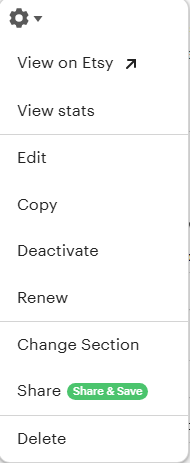
First – the only way to share your Etsy Share and Save link is by manually copying it from each individual listing, or the general shop link, and then sharing it. Considering the challenges with social media (such as Instagram, with a very limited timeframe for posts), if you want to get in front of strangers, you need to post regularly. You could be sharing a lot of links and not getting a good return on your time investment.
Depending on where you share this, it may not be worth your time – unless you can automate this. There are a couple of ways you can do this and be effective.
- You can spend the time making blog posts and sharing it out to an audience (and if you don’t have an audience – you can still follow along on my RSS content and implement a lot of the same things for your blog to try to build an audience and reach). This still requires you to take the time to build a blog.
- You can automate everything using Etsy’s RSS and my new software for automating that RSS feed.
Honestly, the first one could get you more reach and my free content on YouTube will still be applicable to help you get that content out. You’re posting your Share & Save link inside each individual blog post (or your main shop link in your blog posts and blog). If you have an audience, this is an easy option (if you have the time). If you don’t have an audience, you could still invest a lot of time with little reach.
My software automates your existing Etsy RSS feed. If you didn’t know, you already have a RSS feed (not sure what an RSS feed is? Learn about it here.). Etsy provides this, but it is only for you to drive traffic back to your listings and you don’t get the reduction. So, you can still use all the information I share on my YouTube channel and use the Etsy RSS feed, automate it all, and not worry about the share & save links.
Or, you can automate the Etsy share & save links and potentially save some money. I say potentially because a lot of people complain that they share the link and never get the credit for that sale. There is nothing we can control about that. All we can do is share the link.
Get Etsy Share & Save Tips + RSS Updates
When you sign up to my list, here’s what you can expect:
- How the Etsy Share & Save links + RSS Works
- Traffic tips for using your RSS feed on Pinterest, blogs, and other channels
- Step-by-step walkthroughs and setup guidance
- Product updates and rollout announcements
- Best practices
Is Etsy RSS worth it?
Maybe. There are some inherent flaws with the Etsy RSS feed. My software automates the share and save link from this feed, so those inherent flaws translate over to my software (for now, I’m working on a solution). Here are some things to consider about Etsy RSS.
- It updates with every “addition”. This means if you create a new listing, the RSS feed gets updated. If you sell something that has quantity, it updates for every item purchased. If someone buys 3 of the same item, it will update the RSS feed 3 times in a row (not great in automation). It will also update the feed for any manual or auto-renewals (also not unique, so not great for automation).
- Etsy has a cap on the number of items that pull from the RSS feed. So, if you’re familiar with RSS readers, it can only read either 10 or 25 listings (reports vary on the correct number). In checking my reader, it shows 105 listings – but my reader could be indexing it. Typically, Etsy claims the limit is either 10 or 25, depending on the documentation you read. This means you can’t pull all of your listings through RSS. If you have a lot of listings, it might be worth exporting them into a file and manipulating the URL (if you need this – reach out through my Facebook group and ask – I’ll show you how to do it for free).
- The feed doesn’t update unless there is a “trigger” (see #1 for the “triggers”). So, if you go on vacation, stop listing and don’t have sales for a while, or some other reason you don’t have an update to the RSS feed – your automation isn’t doing anything for you.
- Etsy rewards Etsy for your efforts. Believe it or not, whether you share an Etsy link or a Share and Save link, Etsy has a high chance of placing other people’s products ABOVE your product listing. So, people can click on the link, see a bunch of other listings, and click away – even though you drove the traffic! This is why I’m pro you’re on website, but we will discuss that another time.
I’m sure there are other challenges I am not thinking of right now, and reading some of those (especially the last one) – it may not seem like a great idea to use the feed at all. However, there are pros to the Etsy RSS feed.
Why Use the Etsy RSS Feed?
While there are some distinct disadvantages for using the Etsy RSS feed (or even my automated share and save RSS feed), there are some pretty good reasons, too.
- Etsy is a very large, branded website. This means it is much more likely to convert into a sale versus your own website. So, even though other sellers’ listings may be shared on what you promote – your odds are still better that you’ll get more sales on Etsy versus your own website (and this doesn’t take away from selling on your own website).
- Etsy claims to have over 96 million active buyers with revenue of $2.8 billion effective 2024 (and when 2025 releases, we’ll see how much that changes – but it will probably still be in the billions).
- When shared right and to the right platforms, using RSS is a great way to automatically or mostly-automatically update your social media, blogs, and bookmarking sites. I show you how to do this with free videos on YouTube.
- If you use the Share and Save version, you significantly increase the odds you save some money – but only if you have enough links out there…which is easier to do with automation.
- You can automate RSS feeds, even Etsy’s (or my share and save option), and significantly decrease the amount of time spent on sharing updates, and you can do it on many platforms.
- My biggest pitch for RSS is that you save A LOT of time when you automate. Plus, I give you free guidance on how to do that for either really cheap or moderately cheap (it just depends on what you want to do). Whether you use my Share & Save RSS or the Etsy RSS, both give you a chance to help drive more traffic to your listings.
What’s the Next Steps?
I recommend learning more about my Share & Save RSS feed option. You can also hop onto my YouTube channel and start learning about RSS and how to implement it. If you’re inclined, you can start building your digital “assets” today. You can find the Little Biz Resources YouTube Channel here.
Get Etsy Share & Save Tips + RSS Updates
When you sign up to my list, here’s what you can expect:
- How the Etsy Share & Save links + RSS Works
- Traffic tips for using your RSS feed on Pinterest, blogs, and other channels
- Step-by-step walkthroughs and setup guidance
- Product updates and rollout announcements
- Best practices